New · SolutionRelay connector for Claude

Scope and manage
expert solutions
in Claude

Connect SolutionRelay to Claude and the conversation you're already having becomes a brief specialists can price. When their proposals come in, ask Claude to compare them against what you asked for.

Free to connect and free to submit.

Adding a connector is easiest on a computer.

Submit your problem on the site now
published solutions
850+
to submit a problem
Free
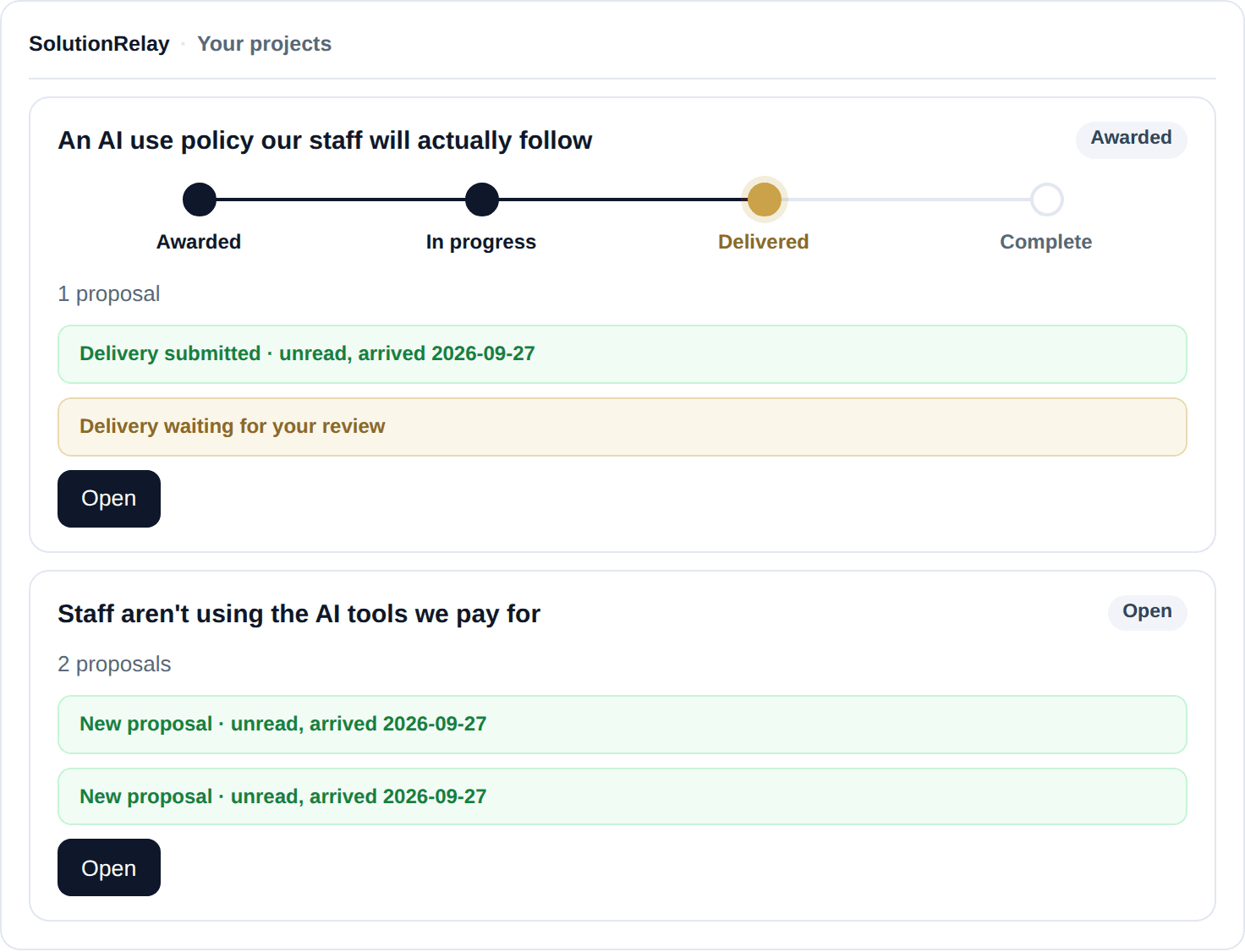
Example: the SolutionRelay card in Claude listing three projects. The AI use policy project shows its stages with Delivered current and a delivery waiting for review; the AI tools project has two unread proposals; the customer support brief is pending review.

What it does

From your first brief to the final delivery

The connector lets Claude work with your SolutionRelay account. Anything that commits you, like submitting a brief or awarding a proposal, still happens on SolutionRelay, where you confirm it.

Draft

Draft a brief specialists can price

Describe what's going wrong the way you'd explain it to a colleague. Claude drafts the brief straight away and tells you what to add before you submit. Ask it to update the draft, then review and submit it on SolutionRelay.

Try asking

“Draft a SolutionRelay brief for this: customers wait two days for a reply from our support team, and it's costing us renewals.”
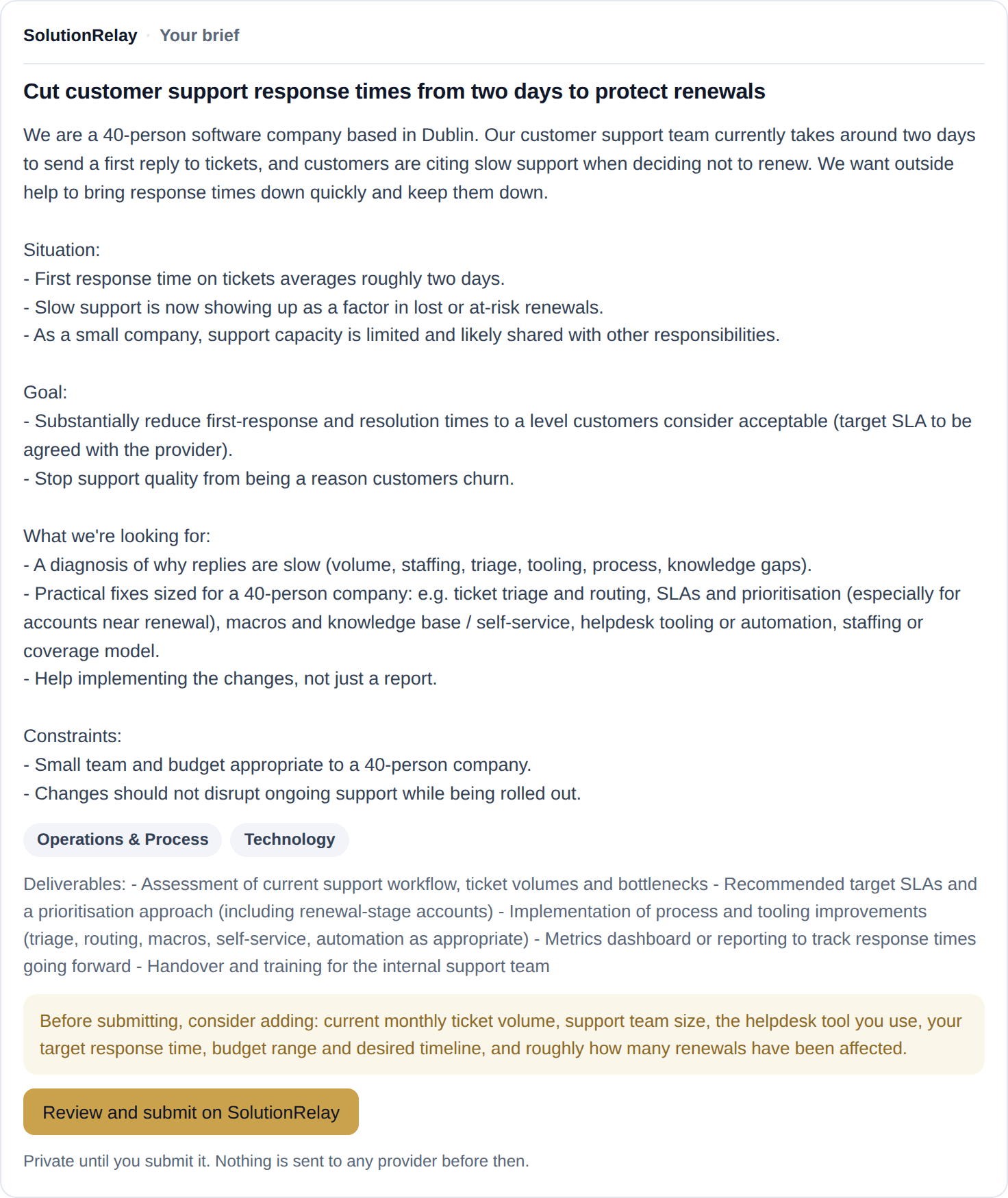
Example: the SolutionRelay brief card in Claude, "Cut customer support response times from two days to protect renewals", with the situation, goal, scope and constraints, suggested details to add, and a button to review and submit on SolutionRelay.
Submit

Submit it on SolutionRelay in a few clicks

When the brief is ready, Claude gives you a link with everything filled in. Sign in, see the budget estimate for your market, and submit. Your problem is submitted confidentially, and only matched specialists see it.

Try asking

“Use SolutionRelay to send this brief.”

Compare

Compare proposals against your brief

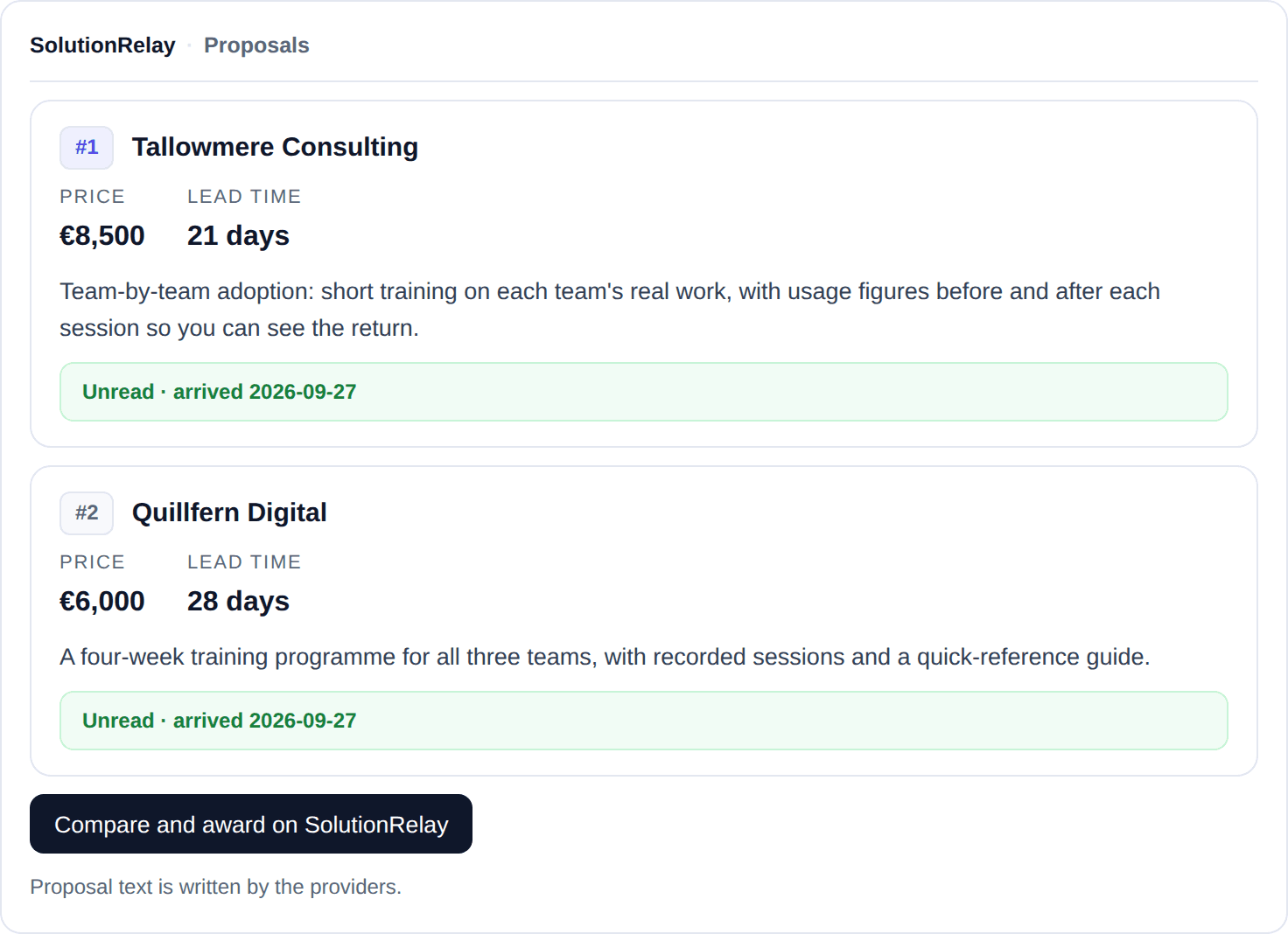
Proposals come back in the order SolutionRelay ranks them. Claude reads each one in full, sets it against what you asked for, and points out gaps and questions worth asking. When you're ready, you award it on SolutionRelay.

Try asking

“Use SolutionRelay to compare the two proposals for my AI adoption problem. Which one says how they will show staff are using the tools?”

Example: the SolutionRelay proposals card in Claude. #1 Tallowmere Consulting, €8,500, 21 days; #2 Quillfern Digital, €6,000, 28 days; both unread, with a button to compare and award on SolutionRelay.
Deliver

Follow the work through to delivery

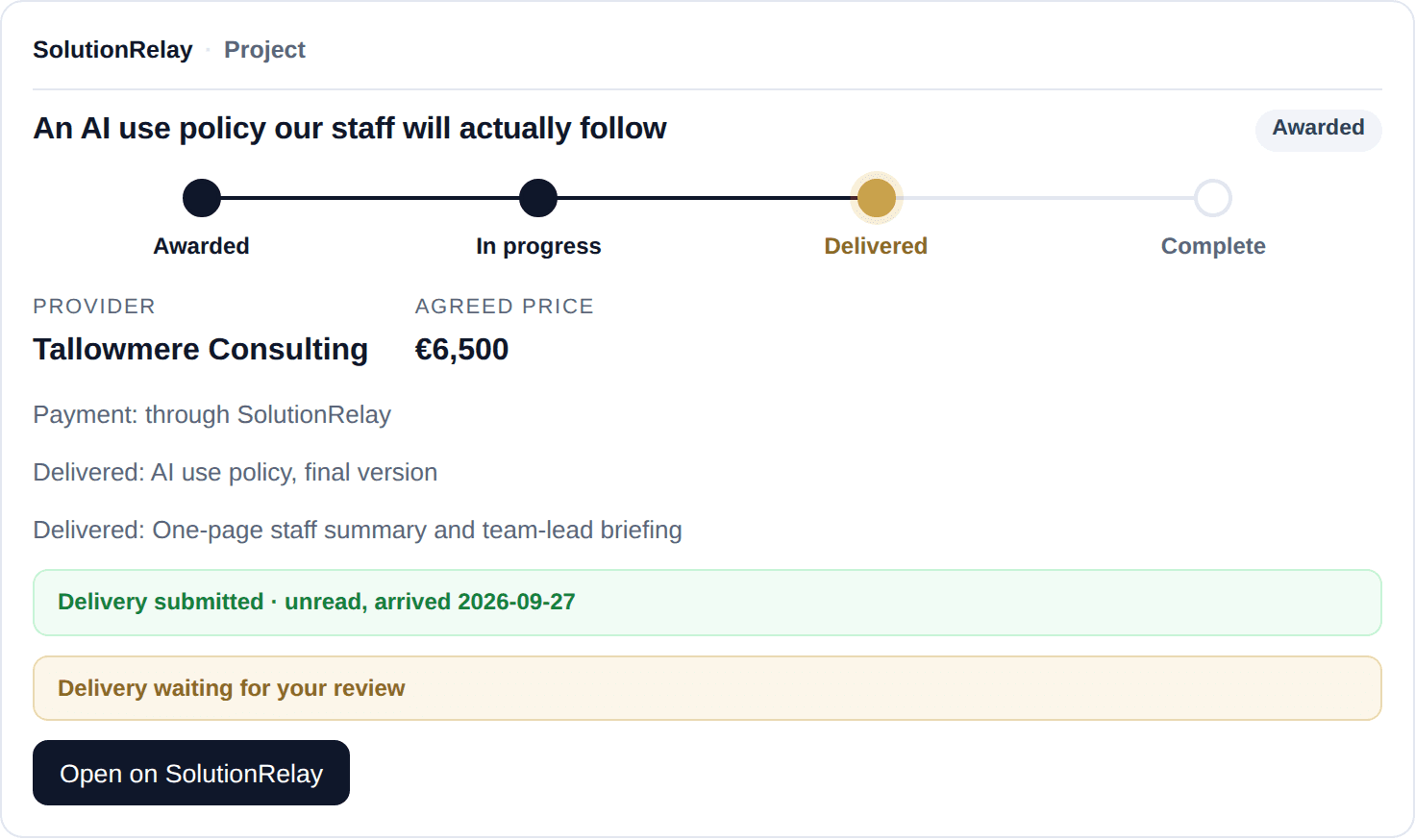
Once you award, ask Claude where the project stands, such as work waiting for your review or messages you haven't read. You can also ask what's arrived across all your projects this week. The project itself runs on SolutionRelay, from messages to payment, and we still email you when something needs you.

Try asking

“Ask SolutionRelay how my AI use policy project is going.”

Example: the SolutionRelay project card in Claude for "An AI use policy our staff will actually follow": Delivered, Tallowmere Consulting, agreed price €6,500 through SolutionRelay, two delivered items waiting for review.
Browse

Browse published solutions first

Not sure what you need yet? Ask Claude what's been done about problems like yours, and it searches the solutions specialists have published on SolutionRelay.

Try asking

“Use SolutionRelay to find published solutions for getting more from our AI tools.”

How it works

Five steps from a chat to a delivered project

01
Add the connector
Add SolutionRelay under Connectors in Claude. It takes about a minute.
02
Talk it through
Describe the problem. Claude drafts the brief straight away and tells you what to add.
03
Submit on SolutionRelay
Open Claude's link, sign in, check your estimate and submit confidentially.
04
Compare and award
We email you as proposals arrive. Compare them in Claude, then award on SolutionRelay.
05
Follow it to delivery
Work with your provider on SolutionRelay through to delivery and payment. Ask Claude how it's going at any time.

You stay in control

Claude does the legwork. You make the decisions.

The connector can draft briefs and read your problems and proposals. It can't commit you to anything.

  • Nothing is submitted without you

    Claude drafts. You check the brief and submit it on SolutionRelay.

  • Awarding, confirming delivery and payment stay on SolutionRelay

    Claude can't award a proposal, confirm a delivery, agree terms or move money.

  • Submitted confidentially

    Your problem isn't published anywhere. Only matched specialists see it.

  • Your conversations stay with Claude

    SolutionRelay only receives what the connector sends, such as a draft brief or a search.

  • One account

    Claude sees the same projects and proposals you do on SolutionRelay, with the date each one arrived. It can tell you how many messages you haven't read, but not what they say.

  • Disconnect any time

    Remove the connector in Claude, or revoke access from your SolutionRelay account settings.

Set up

Add SolutionRelay to Claude

It's a remote connector, so there's nothing to download. You'll need a Claude account; any plan works.

Adding a connector is easiest on a computer.

Submit your problem on the site now

Claude

Available now
  1. In Claude, open Customize and go to Connectors.
  2. Click +, then choose Add custom connector.
  3. Enter the name SolutionRelay and paste the connector URL. Claude pre-selects No sign-in and its published identity: change them, and choose Sign in when needed and Register automatically.
  4. Click Add, then Connect, and sign in to SolutionRelay when asked. No account yet? You can create one in the same step.
  5. In a chat, open the + menu, choose Connectors and switch SolutionRelay on.
  • On Claude Team or Enterprise? An Owner of your organisation adds the connector first, under Organization settings → Connectors. Everyone then clicks Connect.
  • On Claude's free plan you can add one custom connector.
  • The first time Claude uses a SolutionRelay tool, it asks you to allow it. Choose Allow once, or Always allow to stop it asking.

Try asking

Next time you need outside help, tell Claude something like:

  • “Draft a SolutionRelay brief for this.”
  • “What's new on my SolutionRelay projects?”
  • “Compare the proposals on my SolutionRelay project.”

Claude's menus change from time to time. If a step looks different, Anthropic's help article has the latest steps. Anthropic's help article (opens in a new tab)

ChatGPTComing soonSolutionRelay isn't available in ChatGPT yet. It's next on our list.

Questions

What is the SolutionRelay connector?

It links Claude to your SolutionRelay account, so Claude can draft a brief, check on your problems and read the proposals you receive. It's built on the Model Context Protocol (MCP), the open standard Claude uses for connectors.

Does it cost anything?

No. Connecting is free, and so is submitting a problem and receiving proposals.

Do I need a SolutionRelay account?

Yes, to submit and track problems. Claude asks you to sign in the first time it needs to, in a pop-up, and you can create a free account there.

Can I draft more than one brief?

Yes. Each new brief is a separate draft, and you can keep up to ten you haven't submitted. Claude sees the drafts you already have, so you can ask it to update one instead of starting another. Each opens from its own card in My Projects.

Can Claude award a proposal or pay for me?

No. Awarding a proposal, confirming a delivery and anything involving payment happen on SolutionRelay, where you confirm them yourself. Claude can explain your options and give you the link.

Can I manage the project from Claude?

You can check on it from Claude, including unread messages and work waiting for your review. The project itself runs on SolutionRelay, where you review the work and pay.

Who can see my problem?

Only matched specialists. Problems aren't published or listed anywhere public.

Will Claude tell me when a proposal arrives?

No. We email you when one arrives. Then ask Claude what's arrived and it lists each proposal with the date it came in.

Does SolutionRelay see my Claude conversations?

No. We only receive what the connector sends, such as a draft brief, a search or a request to show your proposals. The rest of your conversation stays with Claude.

Which AI assistants does it work with?

Claude, today. ChatGPT is next.

How do I disconnect?

In Claude, go to Customize → Connectors and remove SolutionRelay. You can also revoke access from your SolutionRelay account settings.

Ready to put your problem in front of specialists?

Add the connector in about a minute, or submit on the website if you'd rather.

Claude is a trademark of Anthropic, PBC. SolutionRelay is not affiliated with or endorsed by Anthropic.